
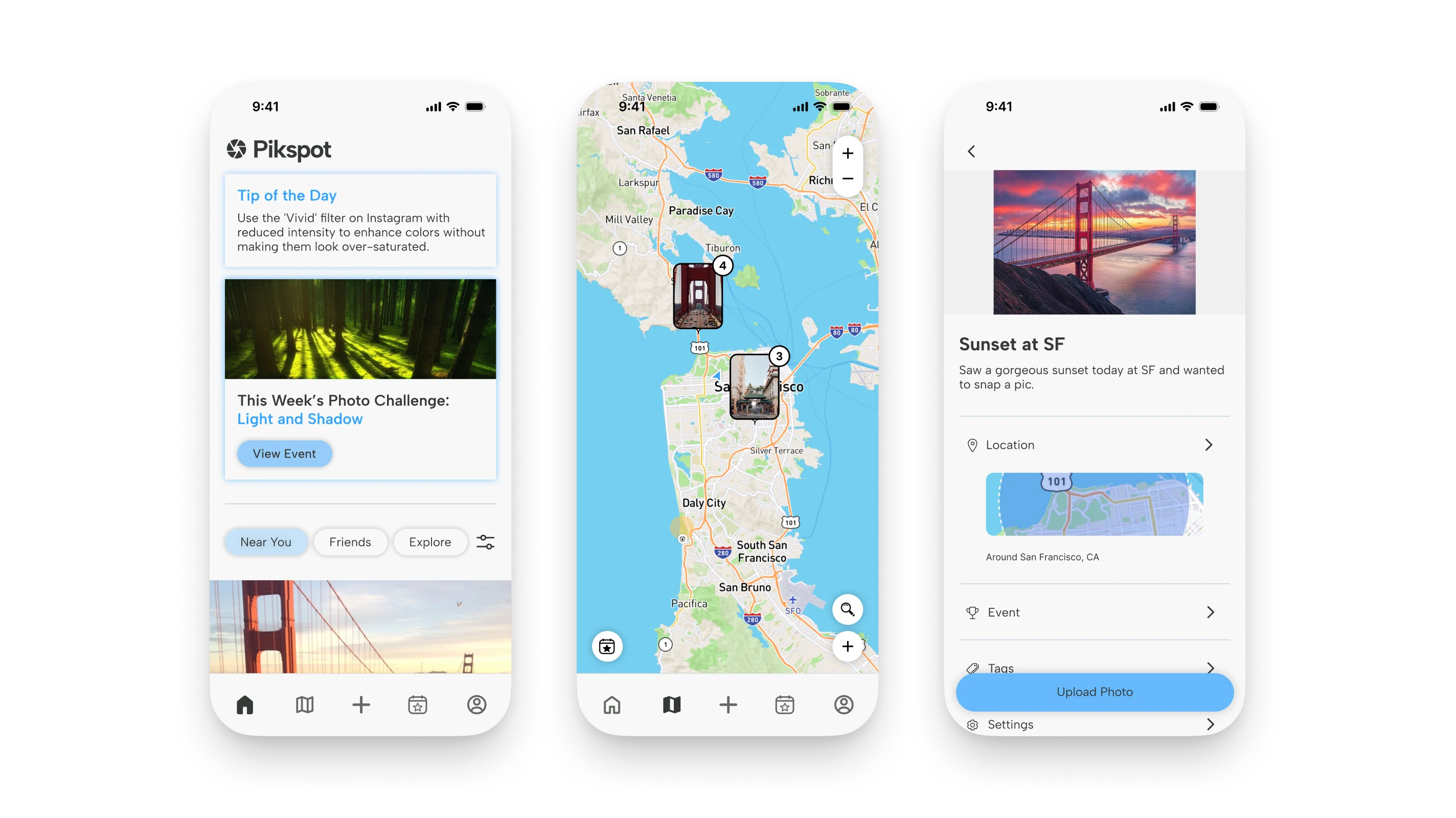
A photography discovery concept built around location and community
Pikspot is a product concept exploring how photographers can discover new places to shoot, participate in creative challenges, and share their work while maintaining control over location privacy.
The project explored how a photography community could balance location discovery with photographers’ desire to protect their favorite spots, translating research insights into a product strategy, interactive prototype, and tested user experience.
The challenge
Make photography spots easier to discover while accommodating different preferences around location sharing.
The process
User research, competitive analysis, insight synthesis, product strategy, interface design, prototyping, and two rounds of usability testing.
My role
UX Research Lead / Product Designer. Led research coordination and synthesis, translated findings into product and design decisions, and contributed across prototyping, usability improvements, and interface design.
The numbers showed what photographers do. The interviews showed why.
I coordinated the survey, interviews, and competitive review of Flickr, Pinterest, VSCO, and Instagram. The findings established how photographers discover spots and where existing platforms fell short.
The interviews revealed a key tension: some photographers wanted to share their locations, while others worried that exposure would attract crowds and ruin what made a place special.
The competitive review revealed an opportunity. The platforms we examined centered on sharing photographs, not helping photographers discover where to take them.

Research takeaway: discovery needed to be easy, but sharing a location couldn’t be an all-or-nothing decision.
Not every photographer wants their spot found
I brought together the quantitative survey data and qualitative interview findings, using AI to help organize observations and surface recurring patterns for further review. I then synthesized those patterns into insights about photographers’ behaviors, motivations, and concerns.
Today, photographers discover places through social media, friends, and chance. Pikspot aimed to make finding new spots easier.
But the research revealed a complication: photographers don’t agree on whether their spots should be discoverable at all.
Posts exact locations and wants others to enjoy the place.
Shares nothing, because a spot that goes viral gets crowded and loses what made it special.
Both kinds of photographer have one thing in common:
find their spots spontaneously. They don’t plan shoots. They notice something and go.
So the real question became:
How might we design an app that complements spontaneity in photography while making it easier to discover and contribute to location-based photography in a way that feels natural and inviting?
Designing for both photographers instead of choosing one
A discovery community depends on people contributing content. But if sharing a photograph means exposing a location someone wants to protect, those photographers may choose not to contribute at all.
The solution was a three-level location-sharing model that lets photographers decide how much information accompanies each upload.
Encouraging participation without forcing a plan
Most photographers don’t plan their shoots in advance. Challenges offer a reason to go out and post, without dictating exactly where to go.
Two rounds, ten participants, three fixes that mattered
I wrote the test tasks and moderated two rounds of usability testing with ten UC Davis students, evaluating a working prototype of the map, challenges, and upload flow.
Three recurring points of friction translated into concrete design changes.
Trophy → calendar
The Events tab used a trophy icon, so testers expected achievements. Replacing it with a calendar made the destination clearer.
Pins → clusters
Testers tapped every pin just to find out what it was. Grouping photos by area made the map easier to scan at a glance.
Two pages → one
Testers couldn’t tell “Main Events” from “Saved Events.” Consolidating them into one page, with Saved and Past moved into icons, reduced the confusion.
From finding a spot to showing your style
Pikspot follows a photographer from the first idea to the finished shot. Each stage responds to a behavior or tension uncovered during research.
“Show me what’s around me, right now.”
A nearby feed and a map that groups photos by area. Tap a cluster to browse what’s been shot there, then zoom in to narrow the search.

“Give me a reason to go out.”
Weekly and local challenges sit at the top of the feed, one tap from joining.

“Let me decide how much to reveal.”
Every upload puts the sharing spectrum into practice: an exact pin, a general radius, or no location at all.

“Let your profile reflect your style.”
Showcase your photography skills with unique achievement badges, from Reflections Champion to Moment Catcher. Feature up to three on your profile to highlight your creative strengths.

What I took away
Research can reveal tensions, not just needs
The biggest insight wasn’t simply that photographers wanted to discover new places. It was that discovery could conflict with their desire to protect those places. I learned how qualitative research can uncover competing user needs and shape a more thoughtful product direction.
Design around real behavior
Learning that many photographers discover spots spontaneously influenced how I approached the discovery experience and creative challenges. I gained a stronger appreciation for designing around how people naturally behave, rather than expecting them to adapt to a product’s workflow.
Testing challenges assumptions
Usability testing revealed friction in navigation, iconography, and information architecture that wasn’t obvious during design. I learned to use user feedback to challenge initial assumptions and make more informed design decisions.